

Your team starts the day in the inbox: customer enquiries waiting for a reply, PDF invoices that someone needs to key into the accounts system and website leads nobody has called yet. None of it is difficult, but it comes round every single day and eats up hours that should be going on selling or looking after customers properly. For years, the answer was automation built on fixed rules, which works as long as everything arrives in the same shape. The trouble is that emails, documents and customers never do, and that’s where intelligent process automation comes in.
What is intelligent process automation?
Intelligent process automation, or IPA, brings two things together: traditional automation, which runs fixed steps, and AI agents that can make sense of messy information, such as an email, a PDF or a WhatsApp message, and decide what to do in each case.
Put simply: rules execute, AI decides. The rules make sure everything is logged, that data reaches the CRM and that reminders go out on time. The AI brings what rules can’t: understanding an enquiry however it’s worded, pulling the data out of an invoice even when every supplier uses a different layout, and knowing when a case needs a person.
The difference in a nutshell
Traditional automation does exactly what you told it to. Intelligent automation understands what comes in and decides the next step, within the limits you set.
BPA, RPA, chatbots and IPA: what’s the difference?
These terms often get used as if they meant the same thing, but they don’t. Each one solves a different kind of problem, and picking the wrong one is the quickest way to end up with an automation project that never quite gets finished:
| Technology | How it works | What it’s good for | Where it falls short |
|---|---|---|---|
| BPA (business process automation) | Connects tools and runs workflows on fixed rules | Moving data between systems, sending alerts, creating records | Only does what it’s been told |
| RPA (robotic process automation) | A software robot repeats clicks and keystrokes on screens | Identical tasks in legacy software with no integration | Breaks when a screen changes or the data arrives differently |
| Traditional chatbot | Answers expected questions with pre-written replies | Tightly scoped FAQs | Ask it something off-script and it’s stuck |
| IPA (intelligent automation with AI agents) | Rules to execute, AI to understand and decide | End-to-end processes with information that varies | Needs human oversight for the decisions that matter |
The difference you notice most day to day is between RPA and IPA. RPA mimics a person sitting at a screen, whereas IPA connects straight to your systems and understands the content. That’s why RPA suits legacy software that leaves you no other option, while IPA suits anything that involves reading, interpreting and responding.
What is an AI agent, and why does it matter?
The AI agent is the piece that makes intelligent automation possible. A chatbot talks; an agent takes action. Every time it receives a task, it goes through the same steps:
- Listens. Picks up the message, document or alert, whichever channel it comes from.
- Understands. Works out what’s being asked, in which language and who it’s for.
- Checks. Looks up the information in your CRM, documents or knowledge base.
- Acts. Replies, logs some data, books an appointment or schedules a follow-up.
- Alerts. If a human call is needed, it hands the case to a person with the full context.
That last step is what separates good automation from risky automation. A well-designed agent doesn’t make things up when something goes off-script: it passes it on to your team. We go into more detail in AI agents for businesses.
Which processes can you automate with AI?
The rule of thumb is simple: you can automate any repetitive, information-based process, even when that information arrives in a mess. These are the ones that save the most hours in the projects we work on:
- Customer service. A chatbot on your website, a WhatsApp assistant, email replies in the customer’s language and enquiry triage by topic and urgency. We cover it in AI customer service.
- Sales. Lead capture into the CRM, replies within minutes, qualification, automated follow-up and draft quotes. More in sales automation.
- Admin and documents. Reading invoices and delivery notes, pulling data from contracts, generating documents from forms and validating data. More in AI document processing.
- Marketing. Draft content and replies to reviews, always signed off by your team before anything goes out.
- Operations. Connecting your tools so nobody has to copy and paste, plus weekly reports that turn up on their own.
- HR. Onboarding new starters, sending out paperwork and answering common questions.
How much is not automating costing you?Work out in a minute how many hours and euros you could win back each month.
A real example: from first enquiry to enrolment, hands-free
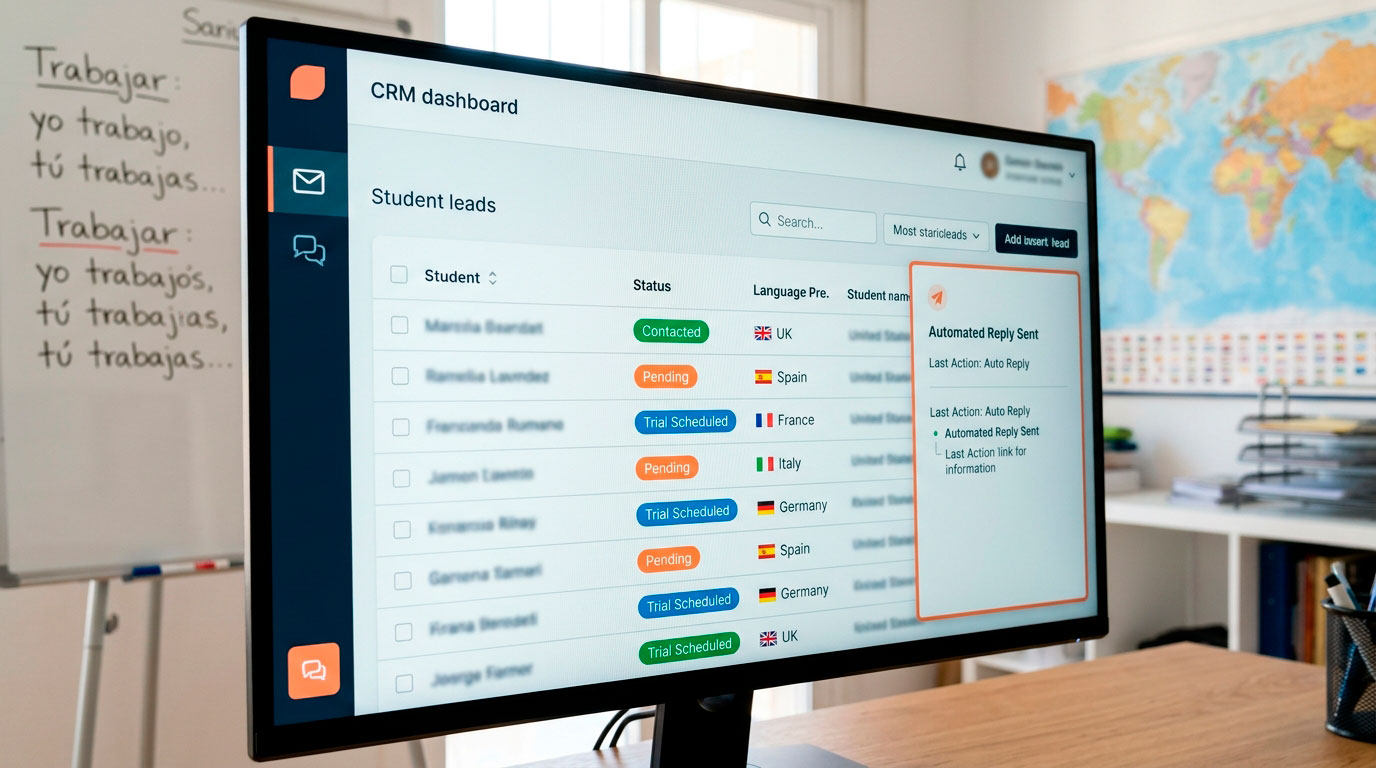
For a Spanish language school in Madrid with students from all over the world, we automated the entire admissions process. Enquiries came in by email, through the contact form, the level test and online enrolment, in lots of languages and at all hours, and a single team had to deal with every one of them.
Today, every email or form creates or updates the student’s record in a CRM, complete with its history. The AI detects the language and intent of the message, drafts the reply using the school’s real information and decides whether to reply, hand the case to a person or log the enrolment. If the student goes quiet, they get a reminder after 24 hours and another after 72. Special cases switch to manual control, with an alert to the team.
Those 13 automated workflows have handled more than 5,000 leads, and 886 students have taken the level test after the automated follow-up. You can see every workflow in the full language school case study.
What you shouldn’t leave to AI
Automating well also means knowing where to stop. In these cases, we recommend the AI prepares the work but a person makes the call:
- Decisions with legal or financial impact. Approving credit, rejecting a claim or changing the terms of a contract.
- Recruitment. The EU AI Act classes systems that screen or assess candidates as high-risk, with specific obligations.
- Diagnosis and professional advice. AI can gather and organise the information, but the judgement belongs to the professional.
- Sensitive conversations. Serious complaints, personal situations or very angry customers.
- Processes that change every week. If there’s no settled way of doing something, sort it out first and automate it second.
And when an assistant talks to your customers, it has to introduce itself as a virtual assistant. It’s a transparency requirement under the EU AI Act, and it builds trust along the way: people don’t mind talking to an AI, they mind when it’s kept from them.
How to get started with AI process automation
The most common mistake is trying to automate everything at once. What works is starting with one process that saves a lot of hours and building out from there. We always follow the same order:
- List the repetitive tasks. How often each one happens every week and how long it takes.
- Pick the process with the most hours and the least risk. It’s usually handling enquiries or following up leads.
- Gather the information. Prices, policies, standard answers and decision criteria.
- Decide what the AI handles and what always goes to a person. This is the most important part of the project.
- Launch, measure and fine-tune. Over the first few weeks, using real conversations and data.
With this approach, a first automation is usually up and running within about four weeks. The price depends on the number of processes, channels and tools that need connecting; you can get a rough idea with our price calculator.
Frequently asked questions
Does intelligent process automation replace RPA?
Not necessarily. RPA is still useful for legacy software that can’t be integrated. IPA is the better choice when the process involves reading, interpreting or responding to information that changes.
Do I need to change my software to automate with AI?
No. The automation plugs into the tools you already use: your CRM, ERP or management software, email, WhatsApp, calendar and spreadsheets.
Is it GDPR-compliant?
Yes, as long as you work with compliant providers, only access the data you need and let customers know they’re talking to a virtual assistant.
What you can do today
Ask your team to jot down, for one week, every task they repeat more than five times. Count how many enquiries come in outside office hours and how long it takes you to reply, and check how many website leads never got a second call or email. With those three numbers, you’ll know which process to automate first.
Automating with AI isn’t about replacing your team. It’s about taking away the work that adds nothing and leaving them the work that does. If you already know which process is costing you the most hours, or you’re not sure and want a second pair of eyes, take a look at our AI process automation services or tell us how you work today.